Greenhouse jobs sync settings
Sync schedule, JobPosting data, sitemap, pay ranges, emails, filters and archives. Every Greenhouse Jobs setting in one place.
Quick answer
Every setting is on Greenhouse → Settings. Only the Board token is required. Jobs sync every 30 minutes. By default each job page gets a sitemap entry, and JobPosting data if it has a location.
On this page
- Greenhouse job board: connection and applications
- Display: jobs address and import schedule
- Features: schema, sitemap and submissions log
- Schema: hiring organization and validity
- JobPosting data: Greenhouse field to JobPosting field
- Privacy: consent checkbox
- Spam protection: Turnstile or reCAPTCHA
- Application emails: hiring team and applicant
- Job views: page view counter
- Job list: page size and filters
- Job archives: one list per department, location and type
- Tools: test, import and clear cache
- How the Greenhouse jobs sync works
- The Jobs screen
Each setting is stored as the WordPress option in the Option column. So WP-CLI can read it:
wp option get ghjb_apply_mode.
Why this matters: Greenhouse jobs on Google for Jobs explains what Google needs from each job page.
Greenhouse job board: connection and applications
| Setting | Option | Default | What it does |
|---|---|---|---|
| Board token | ghjb_board_token | empty | Required. Such as acme from job-boards.greenhouse.io/acme. A full board address or embed address works too. Checked with Greenhouse on save; an unknown board is not saved. Find your token. |
| Job Board API key | ghjb_api_key | empty | Optional. Turns on on-site applications. Must be a Job Board key, not Harvest. Blank keeps the saved key; Remove deletes it. Create one. |
| Applications | ghjb_apply_mode | auto | Where candidates apply. See the next table. |
The board’s data centre is stored as ghjb_board_region: eu, us, or unknown while
Greenhouse can’t be asked. Details: EU boards.
Where candidates apply
| Mode | Value | With a key | Without a key |
|---|---|---|---|
| Automatic | auto | On-site form | Apply on Greenhouse button |
| On-site application form | form | On-site form | Apply on Greenhouse button |
| Send applicants to Greenhouse | redirect | Apply on Greenhouse button | Apply on Greenhouse button |
The form always needs a key, so the first two modes behave the same.
The button links to the job’s Greenhouse posting. That posting may link back to your site, as Greenhouse’s embed does. Then the button opens Greenhouse’s hosted form for the job instead.
A job also shows the button when its questions can’t be loaded. If Greenhouse rejects the key, admins see a notice. See when the API key stops working.
Display: jobs address and import schedule
| Setting | Option | Default | What it does |
|---|---|---|---|
| Jobs page slug | ghjb_jobs_page_slug | jobs | The job list is at /jobs/, each job at /jobs/{job-title}-{id}/. The id is Greenhouse’s job ID. A change applies on the next page load. |
| Import interval | ghjb_sync_interval | 30 minutes | How often jobs are re-imported, from 15 to 1440 minutes. Applies from the next scheduled run. |
| Pay ranges | ghjb_show_pay | on | Shows Greenhouse’s pay ranges as a Pay range row on the job page. Adds baseSalary when the pay period is clear. Off hides both. |
Greenhouse shares only ranges set to show on the job post. How ranges reach the page and Google: Greenhouse pay ranges on WordPress.
| Pay range reads | Detail |
|---|---|
| When | During the import, for new and changed jobs |
| How many | Up to 50 jobs per run (filter ghjb_pay_ranges_per_run). The rest follow on later runs. |
| If one fails | The import still succeeds. |
There is no cache setting. Job lists and pages come from your database. Each job’s questions
are cached for an hour (filter ghjb_application_form_ttl).
Features: schema, sitemap and submissions log
| Setting | Option | Default | What it does |
|---|---|---|---|
| JSON-LD schema | ghjb_enable_schema | on | Adds JobPosting data to each job page. Google for Jobs reads it. Field by field. |
| Jobs sitemap | ghjb_enable_sitemap | on | Lists job pages in the WordPress sitemap at /wp-sitemap-posts-ghjb_job-1.xml. Each job archive gets its own taxonomy sitemap. Off leaves them all out. |
| Log submissions | ghjb_log_submissions | on | Keeps the last 100 application attempts under Greenhouse → Submissions. What each entry shows. |
Greenhouse’s hosted job page may carry JobPosting data for the same job. Google picks which
one to show.
Meta descriptions and SEO plugins
Each job page gets its own meta description, with no setting to turn on. It reads
Title. Location · Type. Summary…, up to 155 characters.
The summary is the first paragraph after the company intro. “About us” sections, and paragraphs at least half your jobs share, are skipped. The jobs page and each job archive get one naming the page and your organization.
| Your site | Description, canonical and social tags |
|---|---|
| No SEO plugin | Printed by this plugin |
| Yoast SEO, Rank Math, AIOSEO, SEOPress or Slim SEO active | Left to that plugin. Yoast SEO and Rank Math still get this plugin’s description where they have none. For a job, Rank Math’s automatic one is replaced too. |
Developers can change the text with the ghjb_job_meta_description and
ghjb_archive_meta_description filters.
Schema: hiring organization and validity
These fill the JobPosting data when JSON-LD schema is on.
| Setting | Option | Default | What it does |
|---|---|---|---|
| Organization name | ghjb_organization_name | empty | The hiringOrganization name. Empty uses Greenhouse’s company name, else your site name. Filter: ghjb_organization_name. |
| Organization logo URL | ghjb_organization_logo | empty | Full URL of a logo image, added to hiringOrganization. |
| Job validity | ghjb_job_validity_days | 30 days | Sets validThrough this many days ahead, from 0 to 365. It counts from the posting date or the last import that found the job open, whichever is later. So an open job never shows as expired. A Greenhouse application deadline wins. 0 leaves validThrough out. |
JobPosting data: Greenhouse field to JobPosting field
The plugin fills each field from what Greenhouse publishes. It leaves a field out rather than guess.
| Greenhouse field | JobPosting field | Notes |
|---|---|---|
| Job title | title | Plain text. |
| Job description | description | Greenhouse’s HTML, filtered like post content. The title if empty. |
| Job ID and company name | identifier | |
| (your job page) | url | yoursite.com/jobs/… |
| First published date | datePosted | |
| Application deadline | validThrough | Else a rolling date from Job validity. |
| “Employment Type” or “Job Type” custom field | employmentType | Mapped to FULL_TIME, PART_TIME, CONTRACTOR, TEMPORARY, INTERN, VOLUNTEER or PER_DIEM. Else a field like “Time Type” or “Schedule” is tried. A value that matches none: OTHER. |
| Company name | hiringOrganization | Organization name wins. Adds your home page, and your logo if set. |
| “Industry” custom field | industry | |
| “Function” or “Job Function” custom field | occupationalCategory | |
| Office addresses, else the location text | jobLocation | Office names are never used. They are often groupings like “EMEA”. |
| Remote location with a country | jobLocationType: TELECOMMUTE and applicantLocationRequirements | Countries come from the location text (“Remote - Canada”) or office addresses. |
| First pay range | baseSalary | Only when the pay period is clear. See below. |
| (on-site form in use) | directApply: true |
No location, no JobPosting. Google rejects a posting that says nowhere where the job is.
A job whose location names no place Google accepts gets no JobPosting data at all. That is
usually a remote job with no country and no office address.
“Remote - Europe” is a region, not a country, so the plugin doesn’t guess. The job’s
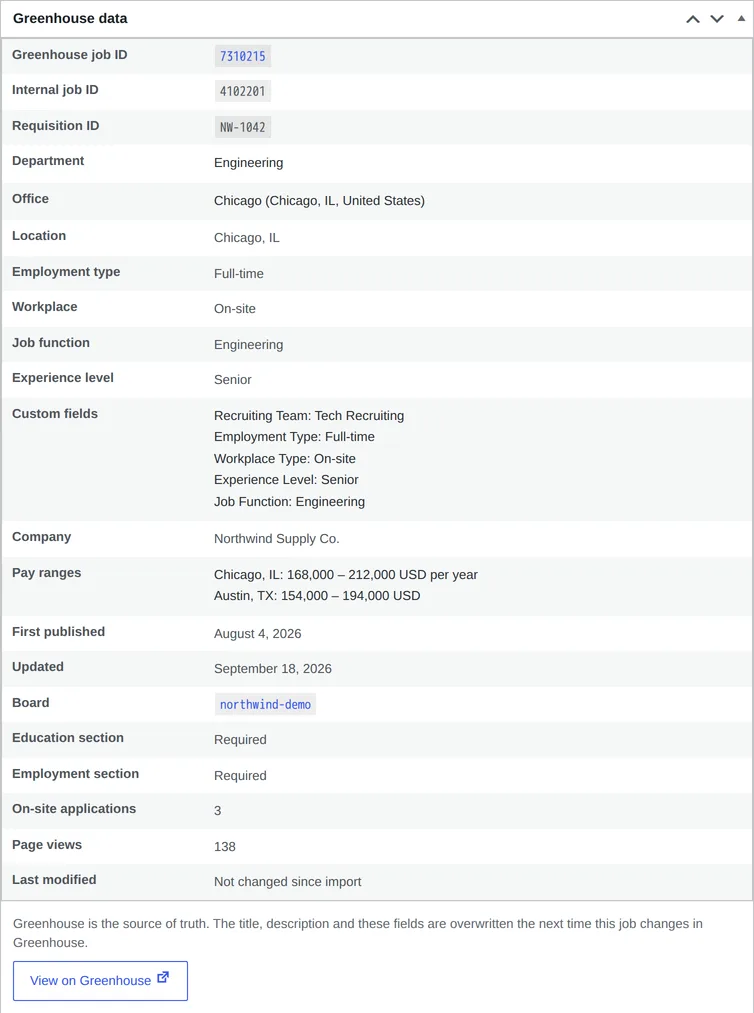
Greenhouse data box says what to add, and wp ghjb status counts these jobs.
Fix it in Greenhouse with an office address. Or supply countries with the
ghjb_schema_applicant_countries filter.
When baseSalary is left out:
| The pay range… | baseSalary |
|---|---|
| names a period (“hourly”, “Annual Base Salary”, “per month”) | Added, with that period |
| names no period, and starts at 15,000 or more in USD, CAD, AUD, NZD, GBP or EUR | Added, as a year |
| names no period, any other amount or currency | Left out. The page still shows the range. |
| is hidden (Pay ranges off) | Left out |
Developers can set the period with the ghjb_pay_range_unit filter. The ghjb_job_schema
filter changes the whole block.
The JobPosting data prints even with an SEO plugin active. If yours also adds job posting
markup, turn one of them off.
Privacy: consent checkbox
| Setting | Option | Default | What it does |
|---|---|---|---|
| Consent checkbox | ghjb_enable_gdpr | off | Adds a required consent checkbox to the application form. |
| Consent text | ghjb_gdpr_text | empty | The wording next to it. Links and basic formatting are allowed. Empty shows “I consent to my data being stored and processed for recruitment purposes.” |
If a job’s Greenhouse data-compliance settings ask for consent, the checkbox shows anyway. The answer goes to Greenhouse.
Spam protection: Turnstile or reCAPTCHA
Set up one provider, or neither. A provider is used only when both its keys are saved. Without one, the form relies on its honeypot field and rate limit.
| Setting | Option |
|---|---|
| Turnstile site key | ghjb_turnstile_site |
| Turnstile secret key | ghjb_turnstile_secret |
| reCAPTCHA site key | ghjb_recaptcha_site |
| reCAPTCHA secret key | ghjb_recaptcha_secret |
reCAPTCHA must be a v3 key. Scores below 0.5 are rejected (filter
ghjb_recaptcha_score_threshold).
Saved secret keys are never shown. Leave a secret blank to keep it, or tick Remove to delete it.
Application emails: hiring team and applicant
Both go out only after Greenhouse accepts an application. Greenhouse may already email your team and candidates, so turn these on only if yours doesn’t.
| Setting | Option | Default | What it does |
|---|---|---|---|
| Notify the hiring team | ghjb_notify_admin | off | Emails the job and the applicant’s name, email and phone. Replies go to the applicant. |
| Notification recipients | ghjb_notify_admin_to | empty | Comma-separated. Empty sends to the site admin email. Invalid addresses are removed on save, with a warning. |
| Confirm to the applicant | ghjb_notify_applicant | off | Emails the applicant a confirmation. |
| Confirmation subject | ghjb_applicant_subject | We received your application for {job_title} | One line of text. |
| Confirmation message | ghjb_applicant_body | A short thank-you signed with your site name | Plain text. |
Placeholders: {first_name}, {last_name}, {job_title}, {job_url} and {site_name}.
Leave a field blank for the default.
Emails are plain text, without the resume or answers. A failed email never fails the application; it shows as Email failed in the Submissions log.
Job views: page view counter
| Setting | Option | Default | What it does |
|---|---|---|---|
| Count views | ghjb_enable_view_tracking | on | Counts views per job, in the Views column under Greenhouse → Jobs. |
A small script counts the view after the page loads, so cached pages count too. It posts to
/wp-json/ghjb/v1/job-view.
| Rule | Detail |
|---|---|
| Repeat views | One per job per browser session. A hashed marker, kept an hour, stops repeats. |
| Not counted | Search engine crawlers, prefetches, logged-in editors |
| Stored | No IP address, no cookie |
| Limit | 60 views an hour per IP address or IPv6 /64 network (filter ghjb_view_rate_limit) |
| Behind a proxy | Fix the address with the ghjb_client_ip filter, or raise the limit. |
Job list: page size and filters
These apply to the jobs page, the job archives, and any shortcode or block that doesn’t set its own.
| Setting | Option | Default | What it does |
|---|---|---|---|
| Jobs per page | ghjb_jobs_per_page | 20 | From 1 to 100. |
| Filters to show | ghjb_filters | Keyword search, Department, Location, Employment type, Workplace | Job function, Industry, Experience level and Education level are also available. Employment type and those four fill only from matching Greenhouse custom fields. |
A dropdown with one choice hides itself. Each option shows its total jobs, not narrowed by other filters. To keep a term out of every dropdown, hide it.
Job archives: one list per department, location and type
Each slug gives a taxonomy its own job lists, one per term, under the jobs page slug. Leave a slug blank to use it only in the filter. How job archives work.
| Setting | Option | Default |
|---|---|---|
| Departments | ghjb_tax_slug_department | department |
| Locations | ghjb_tax_slug_location | location |
| Employment types | ghjb_tax_slug_employment_type | type |
| Workplaces | ghjb_tax_slug_workplace | empty |
| Job functions | ghjb_tax_slug_function | empty |
| Industries | ghjb_tax_slug_industry | empty |
| Experience levels | ghjb_tax_slug_experience | empty |
| Education levels | ghjb_tax_slug_education | empty |
A slug is refused, and the old one kept, if it is page, feed, embed, the jobs page slug,
or used by another taxonomy.
Tools: test, import and clear cache
| Button | What it does |
|---|---|
| Test connection | Fetches your Greenhouse job list and says how many jobs came back. |
| Import jobs now | Runs a full import now, or says one is already running. Below it: the last import and what changed, or Last import failed with the error. |
| Clear cache | Deletes cached Greenhouse replies, including job questions. Use it after changing questions in Greenhouse. Jobs are not touched. |
An HTTP 404 from Greenhouse means the board token is wrong.
How the Greenhouse jobs sync works
| What happens | Result |
|---|---|
| Each import | Fetches your published jobs. New ones are added, changed ones updated, the rest skipped. |
| Each job | A post of type ghjb_job under Greenhouse → Jobs. No Add New: jobs are managed in Greenhouse. |
| Taxonomies | Jobs are filed under department, location, employment type, workplace and more (eight taxonomies). Locations follow your Greenhouse offices, parents included. |
| Workplace | From a custom field, or “remote” / “hybrid” in the location or office |
| Office list | Read each import to build the location tree, with up to 60 seconds allowed. If it fails, the import changes nothing. Job pages never wait for it. |
| A job closes or leaves the board | It moves to the trash. If it returns, so does its page, at the same address. |
| Greenhouse is down or errors | The import changes nothing. Jobs stay up; the next run tries again. |
| Timing | Imports run on WP-Cron, one at a time. On a quiet site a run can start late. |
| More than one board | One per site. Developers can add more with the ghjb_get_boards filter. |
| EU boards | Read from and applied to at boards.eu.greenhouse.io; others use boards-api.greenhouse.io. The ghjb_api_base filter accepts only those two. |
Old ?gh_jid= links on your site redirect to the job’s page while it is open.
What gh_jid is.
The Jobs screen
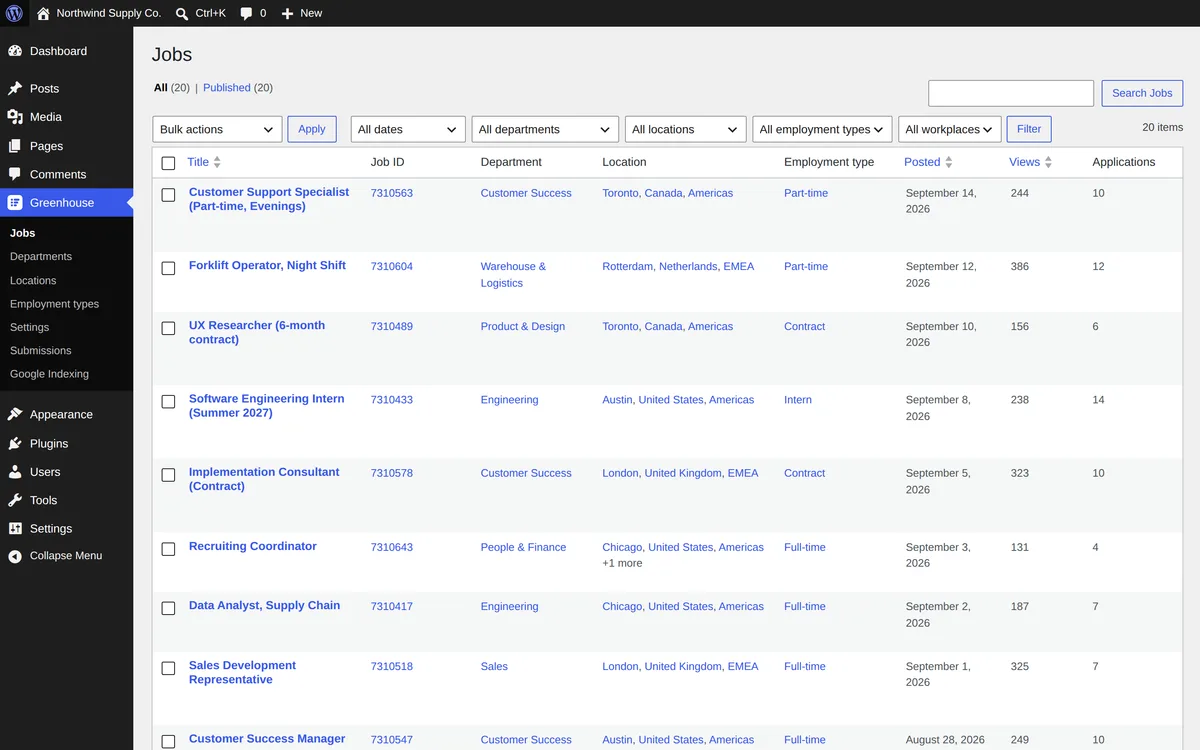
Greenhouse → Jobs lists every imported job. Columns: Job ID (linked to Greenhouse), Department, Location, Employment type, Posted, Views and Applications (accepted through your site).
Sort by Posted or Views. Filter by department, location, employment type or workplace.
Editing a job shows a read-only Greenhouse data box. It lists the fields Greenhouse sent, the counts and a View on Greenhouse link. The next change in Greenhouse overwrites the job.