What is gh_jid? Greenhouse job links explained
gh_jid is the Greenhouse job ID in your careers URL. What it and gh_src do, and how to keep old job links working on WordPress.
Checked on
Short answer:
gh_jidis the Greenhouse job ID.gh_srcis a source token that tracks where the applicant came from.
What gh_jid and gh_src mean
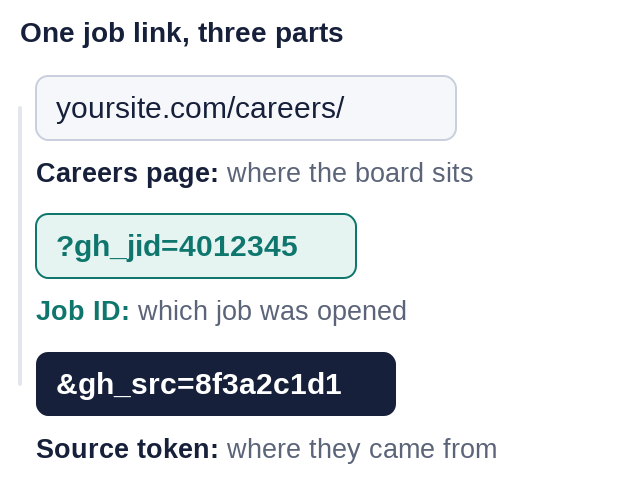
Greenhouse puts it this way: “The Job ID is included in the URL in the parameter
gh_jid={JOB_ID}.”
The source token is “an automatically generated combination of letters and numbers”. Both quotes are from Greenhouse: Tracking a candidate’s source.
So gh_src is a code, not a word like linkedin.
Found gh_jid in a link you were sent?
You don’t need to do anything. The numbers tell the company which job you opened, and where you found it.
Where you see gh_jid
- On a careers page with the Greenhouse embed. Each job opens at the careers page plus
?gh_jid=. - In shared links. People copy that address into emails, chats and social posts.
- From the hosted board. Some boards send job links to the company’s site. Then the hosted
job page redirects to a
?gh_jid=address there. - With
gh_src. Tracking links for job boards or referrals add a source token.
What breaks when you switch careers pages
Old job links live on. They sit in emails, bookmarks and search results.
Remove the embed, and nothing reads gh_jid any more. The link opens your careers page, not the
job.
The visitor has to hunt for it.
Nothing reads gh_src either. So Greenhouse can’t credit the source of an application.
How the plugin keeps old gh_jid links working
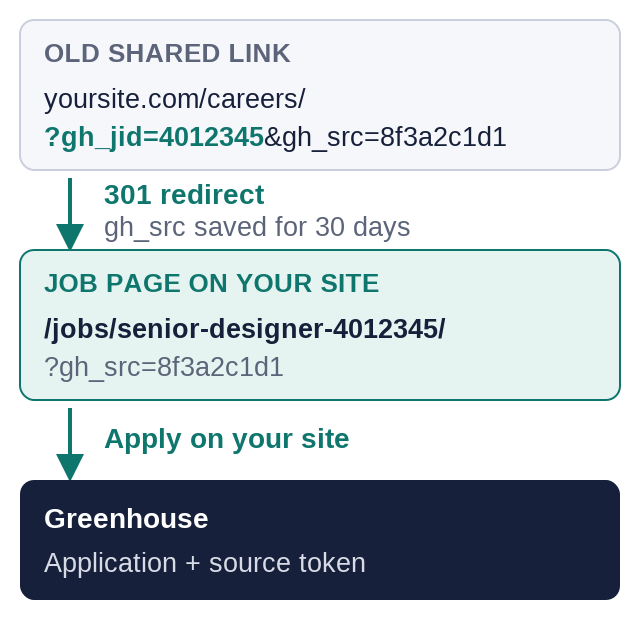
Our Greenhouse WordPress plugin gives each job its own page, such as
/jobs/senior-designer-4012345/. The job ID sits at the end of the address.
| Step | What happens |
|---|---|
A visit to ?gh_jid=4012345 | A 301 redirect to that job’s page. |
| Other parts of the link | Kept. gh_src and utm_ tags ride along. |
The gh_src token | Saved in a cookie for 30 days. It holds the token only. |
| An application on your site | Sent to Greenhouse with the token. |
The 30 days matter. Few people apply on the first visit.
The token travels with applications made on your site. Set that up with the Greenhouse application form.
The “Apply on Greenhouse” button does not pass the token on.
The /jobs/ part of the address is yours to change in
Greenhouse jobs sync settings.
Limits
It works for published jobs only. The old careers URL must be on the same WordPress site.
A closed or unknown job stays on the page.
Developers can change where a link goes with the ghjb_job_link_redirect filter. Return ''
to stay on the page.
Put your Greenhouse jobs on your own site
Each job gets its own page. $69 a year, not on sale yet.