Customize Greenhouse job pages
Customize Greenhouse job pages: edit the block templates in the Site Editor, override any of the 13 PHP templates, or restyle with CSS custom properties.
On this page
Block themes: edit job pages in the Site Editor
On WordPress 6.7 or newer with a block theme, the plugin adds block templates for its pages. Find them under Appearance → Editor → Templates:
| Template | Page | What it holds |
|---|---|---|
| Single Job | Each job | A link back to all jobs, the title, Job Details, the description, Job Application Form, Job Sharing and Related Jobs. |
| Jobs Archive | /jobs/ | Job Archive Breadcrumbs, the page title, Job Filters and Job List. The breadcrumbs show only on job archives. |
| Department archive, Location archive, Employment type archive | Each job archive | The same as Jobs Archive, for one term. |
Each taxonomy with an archive slug gets its own archive template. Edit a template like any other: add, move or remove blocks, or change their settings.
Your version always wins. A template you save in the Site Editor is used instead of the
plugin’s, and so is one your theme ships in its templates folder under the same name, such as
single-ghjb_job.html, archive-ghjb_job.html or taxonomy-ghjb_location.html.
When you build your own archive template, the Jobs archive pattern in the Greenhouse Jobs category inserts the breadcrumbs, title, filters and list in one go.
The plugin’s blocks in these templates render with the PHP templates below, so overriding one of those changes the block too.
Override a PHP template
- Create a
greenhousewpfolder in your theme, ideally a child theme:wp-content/themes/your-theme/greenhousewp/. - Copy the template you want from
wp-content/plugins/greenhousewp/templates/into that folder, keeping the file name. - Edit your copy.
The plugin looks in your theme first and falls back to its own copy, so updates leave your copies alone. The comment at the top of each template lists the variables it receives.
After a plugin update, compare your copies with the new originals. A template may gain a variable or a fix worth carrying over.
The 13 templates
| File | What it renders |
|---|---|
jobs.php | The job list: count, the list itself, grouping and pagination. |
job-list-item.php | One job in the list. |
no-jobs.php | The message shown when no job matches, or none are open. |
jobs-filter-form.php | The search box and the filter dropdowns. |
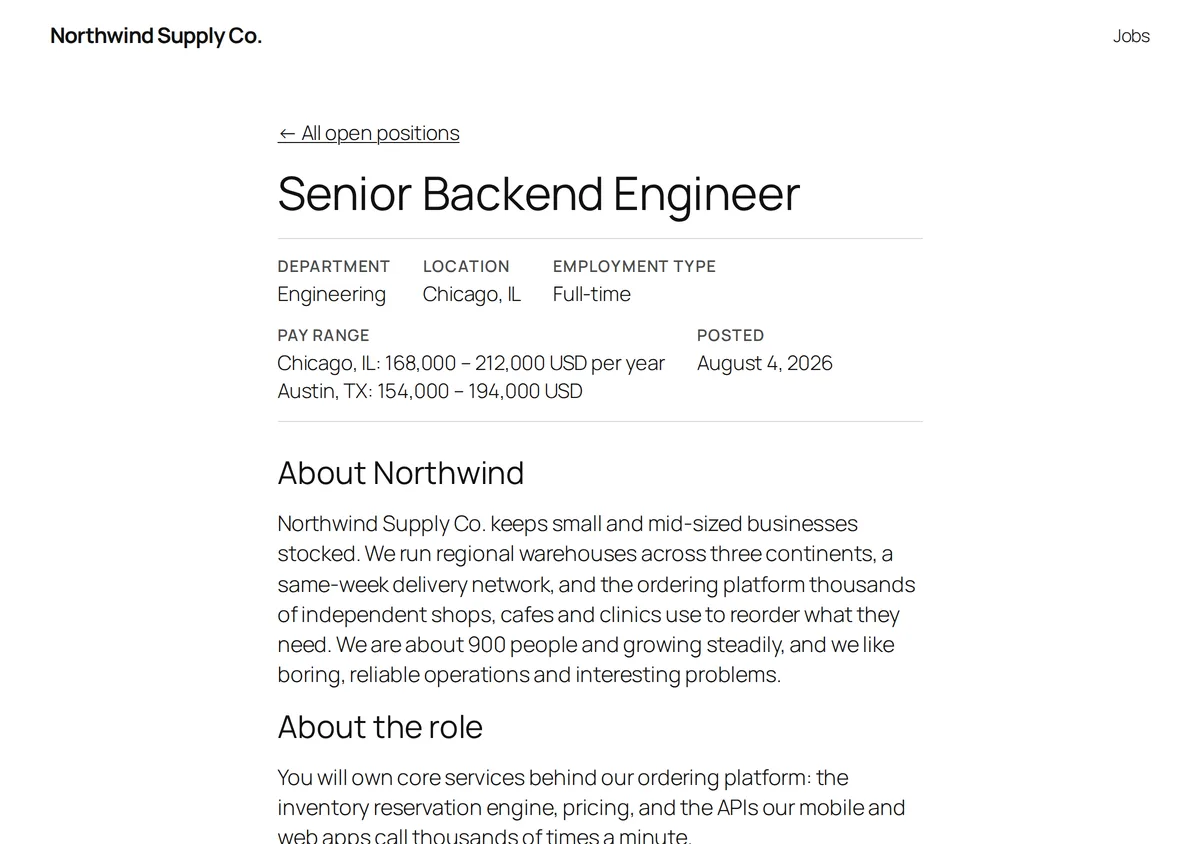
single-job.php | One job: title, details, description, apply area, and on the full job page the related jobs. |
job-meta.php | The details box on a job: department, location, employment type, pay range, the remote or hybrid badge, posting date, the Apply by date, and optionally function, industry, experience and education. |
job-sharing.php | The share links and the Copy link button. |
related-jobs.php | The Related jobs list. |
apply-button.php | The Apply on Greenhouse button. |
application-form.php | The on-site application form: wrapper, status message, AI disclaimer, captcha and submit button. |
application-form-fields.php | The fields inside the application form, including the education and employment sections and the consent checkbox. |
page-jobs.php | The full page around the job list at /jobs/ and around each job archive. |
page-single-job.php | The full page around a single job. |
Take over the whole page on classic themes
page-jobs.php and page-single-job.php build the whole page, including your theme’s header and
footer, on classic themes. A block theme on WordPress older than 6.7 uses them too, with the
theme’s header and footer template parts. With the block templates above, they are not used.
To replace the whole page, either:
- override
greenhousewp/page-jobs.phporgreenhousewp/page-single-job.phpas above, or - add a standard WordPress template for the
ghjb_jobpost type to your theme:archive-ghjb_job.phpfor the list,single-ghjb_job.phpfor a job,taxonomy-ghjb_department.phpand the like for job archives. The plugin uses them when your theme has them.
Restyle with CSS classes and custom properties
Every element has a class starting with ghjb-. Job lists, filter forms, single jobs and the
apply area sit inside a .ghjb-root wrapper. The main classes:
| Class | Element |
|---|---|
.ghjb-jobs | The job list wrapper |
.ghjb-job-item | One job in the list |
.ghjb-filters | The filter form |
.ghjb-single | The single job wrapper |
.ghjb-job | A job’s content |
.ghjb-apply-button | The Apply on Greenhouse button |
.ghjb-application | The application form |
.ghjb-share | The share links |
.ghjb-related | The related jobs list |
.ghjb-pagination | Page links |
.ghjb-no-jobs | The empty message |
Colours, spacing and corners are CSS custom properties on .ghjb-root. Override them in one
rule in your theme’s stylesheet or in Appearance → Customize → Additional CSS. For example:
.ghjb-root {
	--ghjb-accent: #0a5cff;          /* buttons and links */
	--ghjb-accent-contrast: #ffffff; /* text on the accent colour */
	--ghjb-border: #e2e2e2;
	--ghjb-muted: #6b6b6b;           /* secondary text */
	--ghjb-surface: transparent;     /* card background */
	--ghjb-radius: 4px;
	--ghjb-gap: 1rem;
	--ghjb-gap-lg: 2rem;
}
By default the accent follows your block theme’s contrast colour and the text on it follows
its base colour. Borders and secondary text are your theme’s text colour, faded, so they suit
light and dark themes without any CSS.
Developer hooks
| Hook | Type | Use it to |
|---|---|---|
ghjb_locate_template | filter | Change which file is used for a template. Receives the path and the template name. |
ghjb_template_args | filter | Add or change the variables a template receives. Receives the arguments and the template name. |
ghjb_normalized_job | filter | Change a job as it is imported from Greenhouse, before it is saved. Receives the job and Greenhouse’s raw data. |
ghjb_normalized_post_job | filter | Change a job as it is read back from WordPress for display. |
ghjb_job_schema | filter | Change the JobPosting structured data for a job. |
ghjb_organization_name | filter | Change the organization name: hiringOrganization in the JobPosting data, the og:site_name tag and the archive meta descriptions. The plugin prints its sharing tags only when no SEO plugin (Yoast, Rank Math, AIOSEO, SEOPress, Slim SEO) is active. |
ghjb_job_meta_description | filter | Change a job page’s meta description. Receives the description, at most 155 characters, and the job. Also used for the description handed to Yoast SEO and Rank Math. |
ghjb_archive_meta_description | filter | Change the meta description of /jobs/ and each job archive. Receives the description and the term (null on /jobs/). |
ghjb_job_list_heading_level | filter | Change the heading level of job titles in a list, 2 to 6. Receives the level and the list’s attributes. |
ghjb_jobs_page_title | filter | Change the list title on /jobs/ and on job archives. Receives the title and the term (null on /jobs/). Default “Careers”. |
ghjb_job_permalink | filter | Change a job’s link. |
ghjb_jobs_page_url | filter | Change the job list’s link. |
ghjb_apply_url | filter | Change where the Apply on Greenhouse button points. |
ghjb_jobs_query_args | filter | Change the arguments used to query the job list. |
ghjb_jobs_database_query | filter | Return false to build job lists from every stored job in memory, instead of loading only the jobs a page shows from the database. |
ghjb_share_links | filter | Add, remove or reorder the networks in the share links. Receives the links, the job URL and the title. |
ghjb_block_templates | filter | Return false to use the PHP templates on block themes too. They then replace any block template for job pages, including your own. |
ghjb_enqueue_frontend_assets | filter | Return true to load the plugin’s stylesheet on every page. |
ghjb_sync_completed | action | Run code after each import. Receives the import summary. |
ghjb_job_pay_range_lines | filter | Change the lines in a job’s Pay range row. Receives the lines, the pay ranges and the job. |
ghjb_pay_range_unit | filter | Set the pay period of a range: HOUR, DAY, WEEK, MONTH, YEAR, or '' when unknown. Receives the period and the range. |
ghjb_show_related_jobs | filter | Return false to hide Related Jobs in the job page templates and in the block. |
ghjb_job_link_redirect | filter | Change where a Greenhouse ?gh_jid= job link on your site redirects, or return '' to stay on the page. Receives the URL, the Greenhouse job ID and the post ID. |
Jobs with a pay range in Greenhouse get baseSalary in their JobPosting markup
automatically, from the first range. Greenhouse sends no pay period, so the plugin reads it from
the range’s title or description (“hourly”, “per month”, “Annual Base Salary”). A range that
names none is taken as a year only when its lowest amount is at least 15,000 in USD, CAD, AUD,
NZD, GBP or EUR; otherwise the job gets no baseSalary.
Example: every pay range you publish is monthly, but the ranges don’t say so.
add_filter( 'ghjb_pay_range_unit', function ( $unit, $range ) {
	return '' === $unit ? 'MONTH' : $unit;
}, 10, 2 );
The period then shows on the job page too, as in “4,000 – 5,500 EUR per month”. Turning off Pay ranges
under Greenhouse → Settings → Display removes the row and baseSalary together.
A job’s description is Greenhouse’s HTML, filtered with the rules WordPress applies to post
content (wp_kses_post) on import and again when it is printed. HTML comments are removed, and
the title is stored as plain text. A shortcode typed into a Greenhouse description is shown as
text, never run, wherever the job’s content is printed: the block template, a theme template or
the jobs feed.
Hooks for the application form are listed in Greenhouse application form.