Jobs by department and location
List Greenhouse jobs by department and location: archive pages like /jobs/department/engineering/, eight job taxonomies, and terms you can rename or hide.
On this page
Greenhouse Jobs for WordPress files each imported job under eight taxonomies. Departments, locations and employment types also get a public job list per term, with its own title and sitemap entry.
The eight job taxonomies
| Taxonomy | Filled from Greenhouse’s | Archive by default |
|---|---|---|
Departments (ghjb_department) | departments on the job, one flat term each (parent departments are not filed) | /jobs/department/engineering/ |
Locations (ghjb_location) | offices, nested as Greenhouse nests them, such as EMEA › Ireland | /jobs/location/emea/ireland/ |
Employment types (ghjb_employment_type) | a custom field named “Employment Type” or “Job Type” | /jobs/type/full-time/ |
Workplaces (ghjb_workplace) | Remote, Hybrid or On-site, when the location, an office name or a workplace custom field says so | none |
Job functions (ghjb_function) | a custom field named “Function” or “Job Function” | none |
Industries (ghjb_industry) | a custom field named “Industry” | none |
Experience levels (ghjb_experience) | a custom field named “Experience”, “Experience Level”, “Seniority” or “Seniority Level” | none |
Education levels (ghjb_education) | a custom field named “Education” or “Education Level” | none |
Custom field names are matched without regard to case. A job in several departments or offices is filed under each one. Taxonomies without an archive still work in the job filter; see shortcodes and blocks.
How locations and workplaces are filled
- Locations follow your Greenhouse office tree. When every office sits under one company-wide office, such as “Acme Global”, that top office is skipped, so the list starts at its regions. A job with no office gets one location from its location text. Each import reads the office tree first; if Greenhouse cannot return it, the import stops and runs again at the next scheduled time, so locations never lose their parents.
- Workplaces come from a custom field named like “Workplace”, “Workplace Type”, “Location Type”, “Remote” or “Work Arrangement” when your board has one. Otherwise the plugin looks for “remote” or “hybrid” in the job’s location and office names. A job that says neither gets no workplace, rather than being marked on-site.
- Employment types come from a custom field named “Employment Type” or “Job Type”. Without one, the dropdown and archives stay empty.
- Education levels skip the value “Unspecified”, so it never becomes a term.
What a job archive page shows
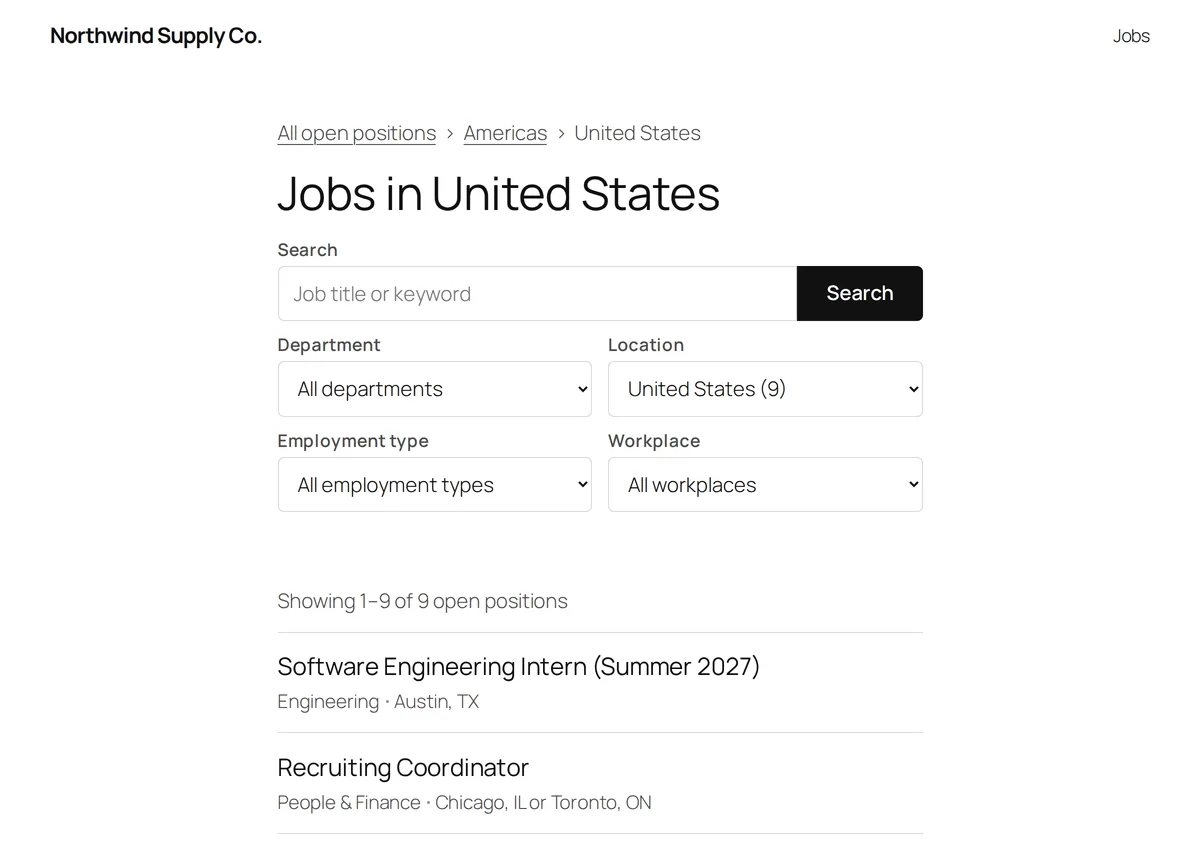
/jobs/location/americas/united-states/: one page per location, with breadcrumbs back up the office tree.An archive lists the open jobs in one term, with the same filters and paging as /jobs/. A
location archive includes the offices below it, so /jobs/location/emea/ lists every job in
that region.
- Title: “Engineering jobs”, “Jobs in Ireland”, “Full-time jobs”. A department whose name already says jobs, such as “Internships”, is used as it is.
- Meta description: the term’s description when you wrote one, else “Engineering jobs at
Acme. Browse the open positions and apply online.”
/jobs/gets “Open positions at Acme. Browse every job and apply online.” The name is the Organization name setting, or your site name. With an SEO plugin active, the plugin does not print it; Yoast SEO and Rank Math receive it when they have none of their own. - Job titles: h2 headings by default, right under the page title. The Job List block’s Job title heading setting changes that.
- Breadcrumbs: a link back to All open positions, then the locations above the one shown. The Job Archive Breadcrumbs block places them in a block theme.
- Paging:
/jobs/department/engineering/page/2/. - Filter form: it starts with the archive’s term selected and submits to
/jobs/, so a filtered list has one shareable address. - Redirects:
/jobs/department/goes to/jobs/, and a location reached by its bare slug, such as/jobs/location/ireland/, goes to its full path. - Sitemap: each archive is listed in the WordPress XML sitemap while Jobs sitemap is on.
Archives sit under the jobs page slug in settings, so changing that slug moves them too.
Change or turn off an archive
Under Greenhouse → Settings → Job archives, each taxonomy has a slug field. Change it to move that taxonomy’s archives, or clear it to turn them off. A new slug works on the next page load; there is no need to re-save permalinks. A slug that WordPress reserves, that matches the jobs page slug or that another taxonomy already uses is refused, and the old slug stays. More in settings.
Manage job terms in wp-admin
Departments, Locations and Employment types have their own entries in the Greenhouse menu. Each term screen links to all eight taxonomies.
- Rename or describe a term, and the next sync keeps your change. A description also becomes the archive’s meta description.
- Hide a term in the Shown in filters column to take it, and every term below it, out of the filter dropdowns and the sitemap. Its archive then returns a 404. Show brings it back.
- Delete is not available. The sync deletes a term once no job uses it, unless you hid, renamed or described it.
Templates and hooks for archives
On a block theme with WordPress 6.7 or newer, each archive has a
block template you can edit in the Site Editor. On other themes, an archive uses your theme’s greenhousewp/page-jobs.php
first, then taxonomy-{taxonomy}-{term}.php, then taxonomy-{taxonomy}.php, then the plugin’s
own page-jobs.php. See Customize Greenhouse job pages, whose developer
hooks include ghjb_jobs_page_title for the list title.
| Hook | Type | Use it to |
|---|---|---|
ghjb_term_archive_title | filter | Change an archive’s title. Receives the title, the term and the taxonomy name. |
ghjb_archive_meta_description | filter | Change an archive’s meta description. Receives the description and the term (null on /jobs/). |
ghjb_skipped_term_values | filter | Change which Greenhouse values never become terms. Receives an array of taxonomy name => values; the default is 'ghjb_education' => array( 'Unspecified' ). |
ghjb_employment_type_field_names | filter | Change which custom field names fill Employment types. ghjb_function_field_names, ghjb_industry_field_names, ghjb_experience_field_names and ghjb_education_field_names do the same for the other taxonomies. |
ghjb_workplace_field_names | filter | Change which custom field names are read as the job’s workplace. |