Greenhouse jobs shortcode and blocks
Embed Greenhouse jobs in WordPress with the [ghjb_jobs] shortcode or the Job List block, and filter by department or location.
On this page
- Which Greenhouse jobs shortcode or block to use
- [ghjb_jobs]: the job list
- [ghjb_filters]: filter by department or location
- [ghjb_job]: one job
- [ghjb_apply]: the apply area on its own
- [ghjb_job_meta]: job details
- [ghjb_job_sharing]: share links
- [ghjb_related_jobs]: related jobs
- Load the styles on custom layouts
Your jobs already have a list at /jobs/, an address you can
change in the settings. Use these to
show them anywhere else, such as a careers page you designed or a landing page.
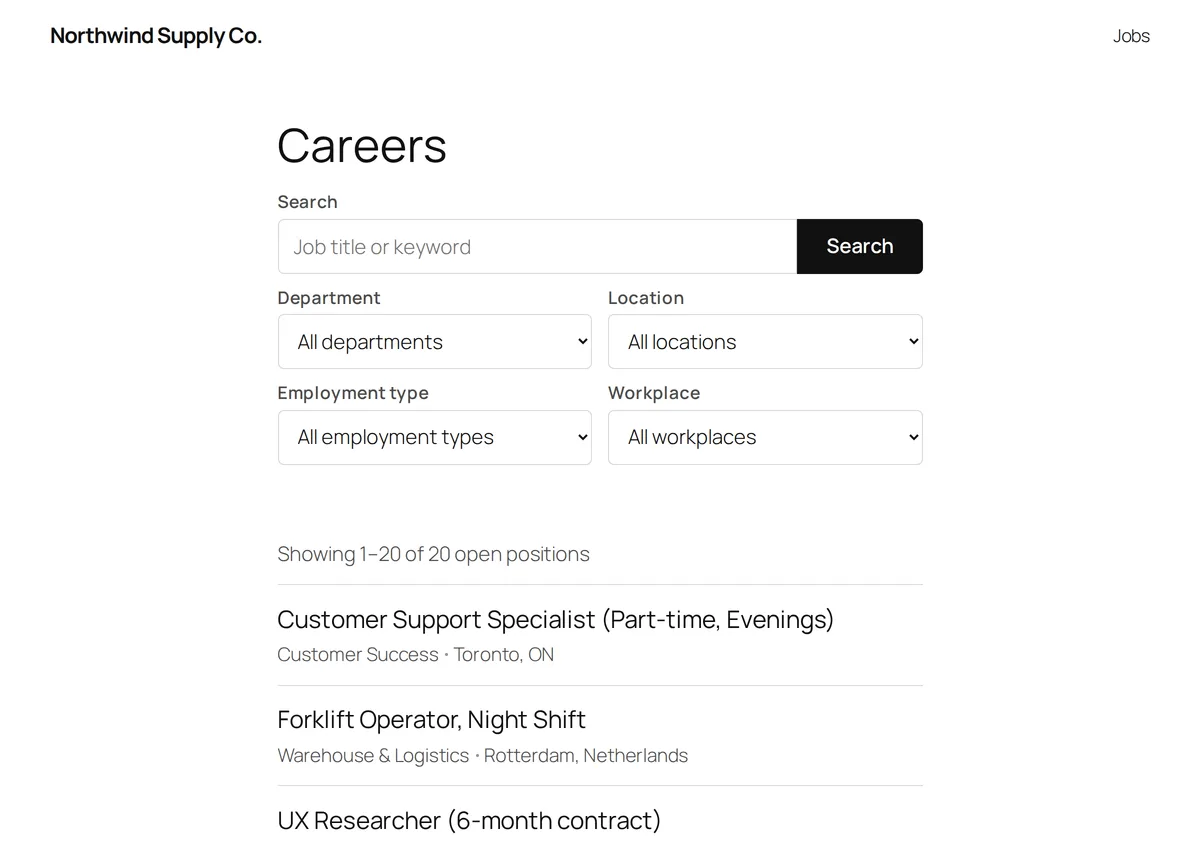
Which Greenhouse jobs shortcode or block to use
| Shortcode | What it shows | Block name |
|---|---|---|
[ghjb_jobs] | The job list | ghjb/job-list |
[ghjb_filters] | The search and filter form | ghjb/job-filters |
[ghjb_job] | One job | ghjb/single-job |
[ghjb_apply] | The apply area for one job | ghjb/application-form |
[ghjb_job_meta] | One job’s details: department, location, pay range and more | ghjb/job-meta |
[ghjb_job_sharing] | Share links for one job | ghjb/job-sharing |
[ghjb_related_jobs] | Other open jobs like this one | ghjb/related-jobs |
| None | On a job archive, a link back to all jobs and the locations above a city or region | ghjb/archive-breadcrumbs |
In the block editor, search the inserter for “Job” to find Job List, Job Filters, Single Job, Job Application Form, Job Details, Job Sharing, Related Jobs and Job Archive Breadcrumbs. Each renders exactly what its shortcode renders. Job List and Job Filters show a live preview. The five blocks that show one job preview once a job ID is set; left blank, they show a placeholder and render the job being viewed. Job Archive Breadcrumbs has no settings and shows only on job archive pages.
The sidebar holds each block’s settings:
| Block | Sidebar settings |
|---|---|
| Job List | Jobs per page, columns, department, location, employment type, workplace, grouping, Job title heading, and toggles for the filter form, count, pagination, department, location, date and excerpt. |
| Job Filters | Use the site setting or a switch per filter, location levels, job counts, hiding a one-option dropdown, and live results. |
| Single Job | Job ID, and toggles for the title, details and apply area. |
| Job Application Form, Job Sharing | Job ID. |
| Job Details | Job ID, and a toggle per detail, including Pay range and Application deadline. |
| Related Jobs | Job ID and the number of jobs, 1 to 12. |
In a single job template, leave a one-job block’s ID blank; set one to pin a job on any page.
Attributes without a sidebar setting, such as search or function, keep their default in a
block; use the shortcode for those.
On block themes with WordPress 6.7 or newer, the plugin’s own job page templates are built from these blocks. See block templates.
Yes/no attributes take yes or no.
[ghjb_jobs]: the job list
| Attribute | Default | What it does |
|---|---|---|
per_page | The Jobs per page setting, 20 | Jobs per page. |
columns | 1 | Grid columns, 1 to 4. |
department | empty | Show one department only. Takes its name or slug, for example department="Engineering". |
location | empty | Show only these locations, by name or slug. A location includes the offices below it, so location="emea" shows every job in that region. A comma list shows jobs in any of them. |
type, workplace, function, industry, experience, education | empty | The same for the other job taxonomies, for example type="full-time,part-time" or workplace="remote". |
search | empty | Show only jobs whose title, description, location, department or employment type contains this text. |
show_filters | no | Show the search and filter form above the list, with the filters from the Filters to show setting. |
show_count | yes | Show “Showing 1–20 of 74 open positions”. |
show_pagination | yes | Show page links when there is more than one page. |
show_location | yes | Show each job’s location. |
show_department | yes | Show each job’s department. |
show_date | no | Show each job’s posting date. |
show_excerpt | no | Show a short excerpt of each job’s description. |
group_by | empty | department or office groups the list under department or location headings. |
heading_level | empty (automatic) | The heading level of the job titles, 2 to 6. Automatic is 2 on the jobs page and its archives, where the list sits right under the page title, and 3 elsewhere. In a grouped list, the group names take this level and the job titles the next one down. |
board | empty | Leave empty. The plugin connects one Greenhouse job board. |
Jobs are sorted newest first. An attribute that picks jobs, such as department or search,
wins over what the visitor picks. Its filter is left out of the list’s own form, and out of a
Job Filters block or [ghjb_filters] on the same page.
Developers can change the heading level of every list with the ghjb_job_list_heading_level
filter, which receives the level and the list’s attributes.
[ghjb_jobs show_filters="yes"]
[ghjb_jobs department="Engineering" per_page="5" show_count="no" show_pagination="no"]
[ghjb_jobs columns="2" group_by="department" show_excerpt="yes"][ghjb_filters]: filter by department or location
A standalone search and filter form, for a sidebar or anywhere other than directly above the list.
| Attribute | Default | What it does |
|---|---|---|
filters | empty | The filters to show, in order, as a comma list: search, department, location, type, workplace, function, industry, experience, education. Empty uses the Filters to show setting. |
show_counts | yes | Show the number of jobs next to each option. |
hide_single | yes | Hide a dropdown that has only one option. |
location_depth | 0 | Location levels in the dropdown: 1 top-level locations only, 2 adds the level below, and so on; 0 shows all. |
live | yes | Update the results in place, without reloading the page. |
show_search, show_department, show_office | yes | no hides the search box, department or location dropdown. Older switches; filters is simpler. |
board | empty | Leave empty. |
[ghjb_filters filters="search,location,type"]Dropdowns list only terms with an open job, and leave out
hidden terms. Put a [ghjb_jobs] list on
the same page: the form filters it in place, and updates the address so the filtered list can
be shared. Typing searches half a second after the visitor stops, from the second character;
Enter searches for whatever is in the box. Without JavaScript the form submits normally,
with the same result.
Each filter is a query parameter. ghjb_search holds the search text; the others hold a term
slug: ghjb_department, ghjb_location, ghjb_type, ghjb_workplace, ghjb_function,
ghjb_industry, ghjb_experience and ghjb_education. So /jobs/?ghjb_location=ireland&ghjb_type=full-time
links straight to a filtered list. Pagination uses ghjb_page, or /page/2/ on the jobs page
and its archives. With more than one list on a page, each pages on its own: the first uses
ghjb_page, the second ghjb_page_2, the third ghjb_page_3, and so on.
[ghjb_job]: one job
| Attribute | Default | What it does |
|---|---|---|
id | empty | The job’s Greenhouse job ID: the number at the end of its address, such as id="4012345". Empty uses the job being viewed. |
show_title | no | Show the job title as a heading. |
show_meta | yes | Show the job details, as [ghjb_job_meta] shows them with its defaults. |
show_apply | yes | Show the apply area: the on-site form or the Apply on Greenhouse button. |
board | empty | Leave empty. |
A job’s ID is at the end of its address on your site, for example
/jobs/senior-designer-4012345/, and at the end of its link on your Greenhouse job board, such
as https://job-boards.greenhouse.io/yourcompany/jobs/4012345.
[ghjb_apply]: the apply area on its own
| Attribute | Default | What it does |
|---|---|---|
id | empty | The job’s Greenhouse job ID. Empty uses the job being viewed. |
board | empty | Leave empty. |
It shows the on-site application form when applications are taken on your site, and the Apply on Greenhouse button otherwise. See Greenhouse application form.
[ghjb_job_meta]: job details
The details box on its own, for a custom job layout.
| Attribute | Default | What it does |
|---|---|---|
id | empty | The job’s Greenhouse job ID. Empty uses the job being viewed. |
show_department, show_location, show_type, show_date | yes | Show the department, location, employment type or posting date. |
show_workplace | yes | Show a Remote badge on remote jobs, or Hybrid on hybrid ones. |
show_pay | yes | Show the Pay range row. |
show_deadline | yes | Show the Apply by row, the job’s application deadline in Greenhouse. |
show_function, show_industry, show_experience, show_education | no | Show the job function, industry, experience or education level. |
board | empty | Leave empty. |
Empty details are left out. Function, industry, experience and education fill only when your board has matching custom fields.
Pay range shows the pay ranges Greenhouse publishes with the job, one line each, such as
“146,500 – 198,300 USD per year”. The period shows only when the range names one. When a job
has several ranges, each line starts with the range’s title, usually a location or pay zone.
Turning off Pay ranges under
Greenhouse → Settings → Display
hides the row on every job, whatever show_pay says.
[ghjb_job_meta show_date="no"][ghjb_job_sharing]: share links
Links to share the job on LinkedIn, X, Facebook and by email, plus a Copy link button. They are plain links, so no script from those networks loads on your page. The copy button appears only where the browser can copy.
| Attribute | Default | What it does |
|---|---|---|
id | empty | The job’s Greenhouse job ID. Empty uses the job being viewed. |
board | empty | Leave empty. |
Developers can add, remove or reorder networks with the ghjb_share_links filter.
[ghjb_related_jobs]: related jobs
A short list of other open jobs, to keep candidates browsing. Jobs in the same department come first, then jobs in the same region, newest first. The job being viewed is never listed, and nothing shows when no job matches.
| Attribute | Default | What it does |
|---|---|---|
id | empty | The job to match. Empty uses the job being viewed. |
count | 3 | How many jobs to show, 1 to 12. |
board | empty | Leave empty. |
The job page templates include Related Jobs. Developers can hide it there, and wherever the
Related Jobs block is placed, by returning false from the ghjb_show_related_jobs filter.
Load the styles on custom layouts
The plugin’s stylesheet loads on the jobs pages and on any page whose content holds a [ghjb_
shortcode or a ghjb/ block. A shortcode printed from a theme template or a page builder may
not be detected. Force the stylesheet on with:
add_filter( 'ghjb_enqueue_frontend_assets', '__return_true' );