Connect Greenhouse to WordPress
Find your Greenhouse board token (US or EU). Add a Job Board API key for on-site applications, and sync jobs to yoursite.com/jobs/.
Quick answer
Paste your board token into Greenhouse → Settings and save. Your jobs appear at yoursite.com/jobs/, one page each. Add a Job Board API key only if candidates should apply on your site.
On this page
You need WordPress 6.0 and PHP 7.4 or newer. One site connects to one Greenhouse job board.
Why this matters: how to add Greenhouse jobs to WordPress compares a link, the embed and your own job pages.
Install the plugin
- Download the plugin ZIP from your account on portal.w4dev.com.
- In wp-admin, go to Plugins → Add New Plugin → Upload Plugin.
- Choose the ZIP, click Install Now, then Activate.
A Greenhouse menu appears, with Jobs, Departments, Locations, Employment types, Settings, Submissions and Google Indexing.
Add your license key
Once licensing is live, a Greenhouse → License screen appears. Paste the key from your purchase email there.
The key turns on plugin updates. Your jobs are listed with or without it.
Find your Greenhouse job board token
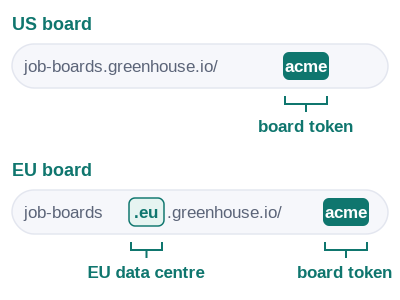
The board token is the last part of your public Greenhouse job board address.
| What you have | Board token |
|---|---|
https://job-boards.greenhouse.io/acme | acme |
https://boards.greenhouse.io/acme (older boards) | acme |
https://job-boards.eu.greenhouse.io/acme (EU boards) | acme |
Greenhouse’s embed code, with ?for=acme | acme |
You can paste any of these whole. The plugin keeps only the token.
The token is public. It is not an API key, and listing jobs needs no key.
Replacing the Greenhouse embed? Old ?gh_jid= job links on your site redirect to the job’s new
page while the job is open. See what gh_jid is.
Save the token and import your jobs
Go to Greenhouse → Settings, fill in Board token and click Save Changes.
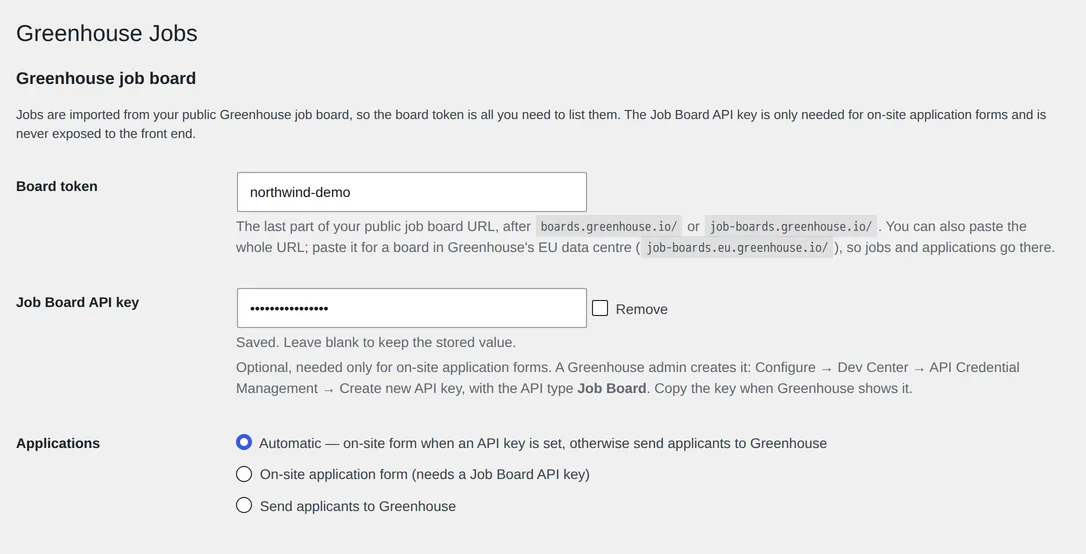
The plugin checks the token with Greenhouse. The first import starts within about a minute.
Your published jobs then appear at https://yoursite.com/jobs/, each on its own page.
Internal-only and unpublished job posts are not listed.
| When you save | What happens |
|---|---|
| Greenhouse knows the board | Token saved. First import follows. |
| Greenhouse has no board with that token | Not saved. The old value stays, and the screen says so. |
| Greenhouse can’t be reached | Token saved. The import reports any problem under Greenhouse → Settings → Tools. |
To import straight away, or test the connection, use the tools at the bottom of the screen.
Create a Job Board API key
You need a key only for on-site applications. Without one, each job shows an Apply on Greenhouse button. Everything else works the same.
Someone with Dev Center access in Greenhouse creates the key. No partner approval is needed.
- In Greenhouse, go to Configure → Dev Center → API Credential Management.
- Click Create new API key.
- Choose the API type Job Board. Describe it, for example “WordPress site”.
- Create the key and copy it.
Use a Job Board key. You don’t need a Harvest key, so don’t use one here.
In WordPress, paste the key into Job Board API key on Greenhouse → Settings and save. With Applications on Automatic, job pages now show the form.
| Key task | How |
|---|---|
| Where it is kept | As an option in your own database. Never printed into a page or sent to browsers. |
| After saving | The field shows a row of dots. |
| Replace it | Paste a new key and save. |
| Delete it | Tick Remove and save. |
How the form works: Greenhouse application form.
EU boards
Greenhouse has a US and an EU data centre. The plugin works with both.
| Board | Jobs read from, applications sent to |
|---|---|
| US | boards-api.greenhouse.io |
| EU | boards.eu.greenhouse.io |
An EU board’s address starts with job-boards.eu.greenhouse.io. Paste that full address. The
plugin then knows where the board lives.
A bare token works too. On save, the plugin asks Greenhouse’s EU data centre if it knows the board.
If Greenhouse can’t be reached then, the settings page shows a warning. Until the check succeeds, jobs are read from and applications sent to the US data centre. The check runs again on the next save or import.
Next steps
Put your Greenhouse jobs on your own site
Each job gets its own page. $69 a year, not on sale yet.