---
title: "What is gh_jid? Greenhouse job links explained"
description: "gh_jid is the Greenhouse job ID in your careers URL. What it and gh_src do, and how to keep old job links working on WordPress."
pubDate: 2026-09-27
updatedDate: 2026-09-27
source: https://greenhouse.w4dev.com/blog/what-is-gh-jid/
---
> **Short answer:** `gh_jid` is the Greenhouse job ID. `gh_src` is a source token that tracks
> where the applicant came from.
## What gh_jid and gh_src mean
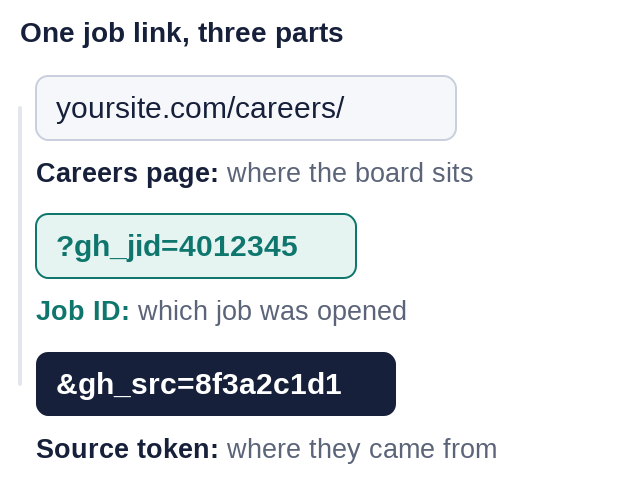
A made-up example. The job ID and token are not real.
Greenhouse puts it this way: "The Job ID is included in the URL in the parameter
`gh_jid={JOB_ID}`."
The source token is "an automatically generated combination of letters and numbers". Both quotes
are from [Greenhouse: Tracking a candidate's source](https://support.greenhouse.io/hc/en-us/articles/216902526).
So `gh_src` is a code, not a word like `linkedin`.
### Found gh_jid in a link you were sent?
You don't need to do anything. The numbers tell the company which job you opened, and where
you found it.
## Where you see gh_jid
- **On a careers page with the Greenhouse embed.** Each job opens at the careers page plus
`?gh_jid=`.
- **In shared links.** People copy that address into emails, chats and social posts.
- **From the hosted board.** Some boards send job links to the company's site. Then the hosted
job page redirects to a `?gh_jid=` address there.
- **With `gh_src`.** Tracking links for job boards or referrals add a source token.
## What breaks when you switch careers pages
Old job links live on. They sit in emails, bookmarks and search results.
Remove the embed, and nothing reads `gh_jid` any more. The link opens your careers page, not the
job.
The visitor has to hunt for it.
Nothing reads `gh_src` either. So Greenhouse can't credit the source of an application.
## How the plugin keeps old gh_jid links working
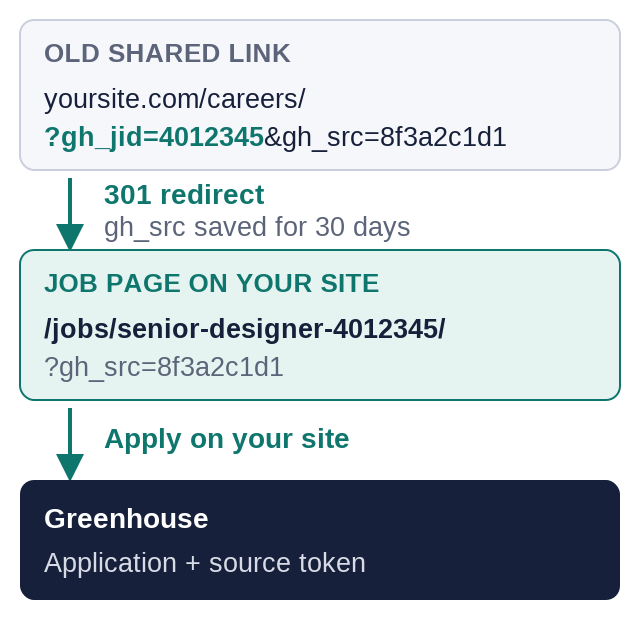
Our [Greenhouse WordPress plugin](/) gives each job its own page, such as
`/jobs/senior-designer-4012345/`. The job ID sits at the end of the address.
An old shared link, after the switch.
| Step | What happens |
|---|---|
| A visit to `?gh_jid=4012345` | A 301 redirect to that job's page. |
| Other parts of the link | Kept. `gh_src` and `utm_` tags ride along. |
| The `gh_src` token | Saved in a cookie for 30 days. It holds the token only. |
| An application on your site | Sent to Greenhouse with the token. |
The 30 days matter. Few people apply on the first visit.
The token travels with applications made on your site. Set that up with the
[Greenhouse application form](/docs/on-site-applications/).
The "Apply on Greenhouse" button does not pass the token on.
The `/jobs/` part of the address is yours to change in
[Greenhouse jobs sync settings](/docs/settings/#display-jobs-address-and-import-schedule).
## Limits
It works for published jobs only. The old careers URL must be on the same WordPress site.
A closed or unknown job stays on the page.
Developers can change where a link goes with the `ghjb_job_link_redirect` filter. Return `''`
to stay on the page.