---
title: "Greenhouse pay transparency on your WordPress job pages"
description: "Show Greenhouse pay transparency ranges on your WordPress job pages and in JobPosting data. What Greenhouse shares, and when baseSalary is left out."
pubDate: 2026-09-27
updatedDate: 2026-09-27
source: https://greenhouse.w4dev.com/blog/greenhouse-pay-ranges-wordpress/
---
> **Short answer:** Greenhouse shares a pay range when one is set on the job post. The
> plugin shows it on the job page. It adds `baseSalary` when the period is clear.
This covers how the data flows. It is not legal advice on pay laws.
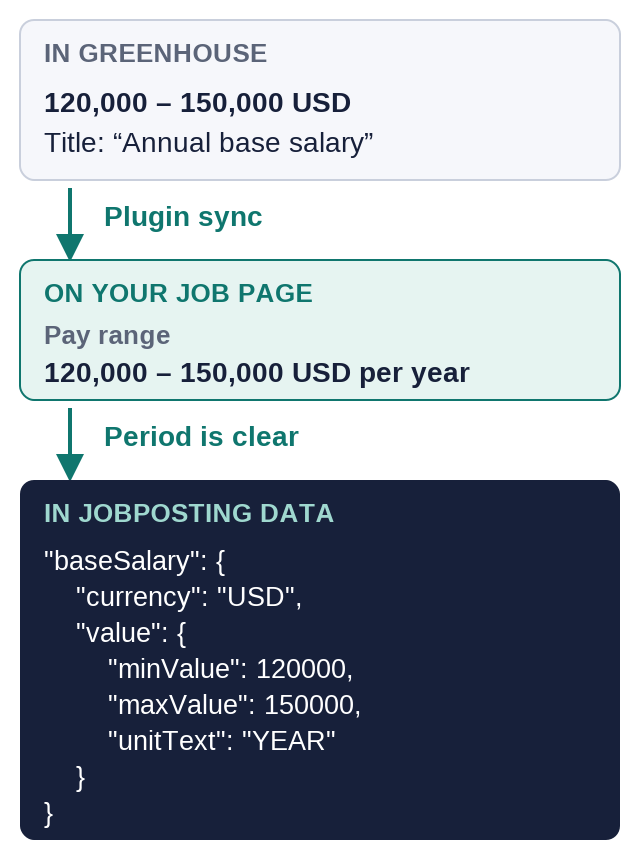
One range, from Greenhouse to Google's job data.
## What Greenhouse pay transparency shares
Greenhouse calls a salary range a pay range.
Greenhouse's Job Board API adds pay ranges when asked with `pay_transparency=true`
([Greenhouse Job Board API](https://docs.greenhouse.io/job-board.html)). Each range has these
fields:
| Field | Example | What it holds |
|---|---|---|
| `min_cents` | `12000000` | The low end, in cents. |
| `max_cents` | `15000000` | The high end, in cents. |
| `currency_type` | `USD` | The currency. |
| `title` | `Annual base salary` | A name, often a place or pay zone. |
| `blurb` | `Plus equity.` | Extra text about the range. The plugin reads it for the period only. |
There is no pay period field. So "per year" or "per hour" has to come from the title or text.
The plugin reads ranges during the sync, for new and changed jobs. It reads up to 50 jobs per
board each run.
A big first import fills in over a few runs.
## What the job page shows
Each range gets a line under **Pay range**. Several ranges, such as one per city, each show
their title.
A job on the fictional Northwind demo board. The Chicago range names its period. The Austin one does not.
The period shows on the page only when the range names it.
## When baseSalary is left out
`baseSalary` in the `JobPosting` data carries a pay period (`unitText`). A wrong period misleads
job seekers more than no salary does.
So the plugin only adds `baseSalary` when it can tell.
| What Greenhouse sends | Shown on the page | In `baseSalary`? |
|---|---|---|
| 120,000–150,000 USD, titled "Annual base salary" | 120,000 – 150,000 USD per year | Yes, `YEAR` |
| 60–80 USD, text says "per hour" | 60 – 80 USD per hour | Yes, `HOUR` |
| 120,000–150,000 USD, no period | 120,000 – 150,000 USD | Yes, taken as `YEAR` |
| 50,000–70,000 INR, no period | 50,000 – 70,000 INR | No |
| 4,000–5,000 EUR, no period | 4,000 – 5,000 EUR | No |
The rules, in order:
1. **A period in the title or text wins.** Words like "hourly", "per month", "annual" or "/yr".
2. **No period, but salary-sized:** at least 15,000 in USD, CAD, AUD, NZD, GBP or EUR. That is
taken as a year.
3. **Anything else:** no `baseSalary`. Other currencies can pay monthly salaries above 15,000.
With several ranges, `baseSalary` uses the first one.
### Set the period yourself
Know your period? Tell the plugin with the `ghjb_pay_range_unit` filter.
It takes `HOUR`,
`DAY`, `WEEK`, `MONTH` or `YEAR`.
```php
add_filter( 'ghjb_pay_range_unit', function ( $unit, $range ) {
if ( '' === $unit && 'INR' === $range['currency_type'] ) {
return 'MONTH';
}
return $unit;
}, 10, 2 );
```
The page line then shows the period too.
For the rest of Google's job data, see our
[Greenhouse Google for Jobs guide](/blog/greenhouse-google-for-jobs-wordpress/).
## Turn pay ranges off
Go to **Greenhouse → Settings → Display** and untick **Pay ranges**.
That hides the page line and `baseSalary` together. The job data always matches the page.
Every display option is in the
[Greenhouse jobs sync settings](/docs/settings/#display-jobs-address-and-import-schedule). Pay
ranges ship with our [Greenhouse WordPress plugin](/).